Are you tired of Visual Studio indicating that you need to install the GIT tools? Is your Visual Studio stuck behind a firewall and unable to access the internet? If so, you can manually download the tools from Microsoft’s GIT on Github
Category Archives: Software Development
Entity Framework Code First migrations and the [StringLength] annotation
Recently I needed to change my model so that a field would be checked for uniqueness. I eagerly added the [StringLength(3)] and [Index(IsUnique = true)] annotations to the model and ran Add-Migration and Update-Database. Close, but no cigar unfortunately. Update-Database kept throwing the following error: System.Data.SqlClient.SqlException (0x80131904): Column 'IsoCode' in table 'dbo.CurrencyModels' is of a type that is invalid for use as a key column in an index.
This is due to the fact that the generated code migration, was only applying the index and not the length restriction. You can fix this directly in the Up() and Down() methods of the code migration by using AlterColumn() as follows:
    public partial class UniqueCurrency : DbMigration
    {
        public override void Up()
        {
            AlterColumn("dbo.CurrencyModels", "IsoCode", c => c.String(maxLength: 3));
            CreateIndex("dbo.CurrencyModels", "IsoCode", unique: true);
        }

        public override void Down()
        {
            AlterColumn("dbo.CurrencyModels", "IsoCode", c => c.String(maxLength: null));
            DropIndex("dbo.CurrencyModels", new[] { "IsoCode" });
        }
    }
Dynamic predicates in C# using PredicateBuilder
One of the challenges I frequently encounter, is having to translate the arbitrary criteria in a testcase to LINQ selection predicates. Take the following very simple example testcase:
Feature: ModifyingInvoices
	In order to demonstrate the usefulness of PredicateBuilder,
        we will show how to verify if a C# collection contains a
        record that matches multiple criteria that are only known
        at run time

Scenario: ModifyDescription
	When I create an invoice with number '123' for '20' euro
	Then The systems invoice store must look like:
	| Number | Amount | DescriptionPresent | Desciption |
	| 123    | 20     | False              |            |
	When I change the description in invoice '123' to 'Testing!'
	Then The systems invoice store must look like:
	| Number | Amount | DescriptionPresent | Description |
	| 123    | 20     | True               | Testing!    |
In this very small example, you already see that the C# code will need to determine at run-time IF an invoice exists AND MAYBE what the contents of its description should be. If an invoice has many fields. this will become exponentially complex in the code. If your criteria requires an OR construct then that’s even more complex. The solution is to use a PredicateBuilder that builds a dynamic predicate
First install the NuGet Package LINQKit (see PredicateBuilder website) Then add the directive using LinqKit; to your code. Now create the code that queries your data like follows:
        [Then(@"The systems invoice store must look like:")]
        public void ThenTheSystemsInvoiceStoreMustLookLike(Table table)
        {
            var rows = table.CreateSet<InvoiceTest>();

            foreach(InvoiceTest test in rows)
            {
                var MyPredicate = LinqKit.PredicateBuilder.True<Invoice>();
                MyPredicate = MyPredicate.And(invoice => invoice.Number == test.Number);
                MyPredicate = MyPredicate.And(invoice => invoice.Amount == test.Amount);

                if (test.DescriptionPresent)
                {
                    MyPredicate = MyPredicate.And(item => item.Desciption.Equals(test.Description));
                }

                //Test that our datastore contains an invoice that matches the predicate from the testcase
                IQueryable<Invoice> Matches = this.Invoices.AsQueryable().Where<Invoice>(MyPredicate);
                Assert.AreEqual(1, Matches.Count());
            }
        }
What to do when your JQuery-ui dialog is hidden behind other elements
If you see your JQuery-ui dialog being hidden by other elements in the webpage, then you need to increase its z-index. I recently ran into the case where the JQXgrid widget was using very high z-indeces outside of my control.
Here’s the code:
ZIndexer = function () {
    var self      = this;
    this.Elements = [];

    this.Add = function (JQuerySelector) {
        var DomElementArray = $(JQuerySelector)
        $.each(DomElementArray, function (i, element) { self.Elements.push(element) })
        return this;
    }

    this.GetNextFreeZIndex = function () {
        var zIndeces = $(this.Elements).sort(function descending(a, b) {
            var bZIndex = $(b).zIndex()
            var aZIndex = $(a).zIndex()
            return bZIndex - aZIndex
        })

        return $(zIndeces[0]).zIndex() + 1;
    }

}

//My grid is in a div with id jqxgrid. All of its child elements need
//to be considered when figuring out the next available ZIndex
var foo = new ZIndexer().Add("#jqxgrid *");

//Set the z-index of the jquery-ui dialog and its overlay to the highest available
$('.ui-widget-overlay').css('z-index',foo.GetNextFreeZIndex());
$('.ui-dialog').css('z-index',foo.GetNextFreeZIndex() + 1);

Performance of JQXGrid combined with knockout
The other day I noticed poor performance of a JQXGrid when combined with knockout. I had an ko.ObservableArray() with objects. Each object contains only 3 ko.observable(). I was using JQXGrid’s selection check-box on each row. Event-handlers were established to react to changes in the check-box and set one of the ko.observable() in the the corresponding object in the array.
On my page I was displaying the following:
- The JQXgrid
- A HTML table using the knockout
foreachbinding. This table displayed a checkbox for 1 of the observables and static text for the other one - A string representation of the ViewModel using
data-bind="text: JSON.stringify(ko.toJS(MyViewModel), null, 4)"
When I increased the number of object in the array, just modifying one check-box caused the UI to slowdown to unacceptable levels.
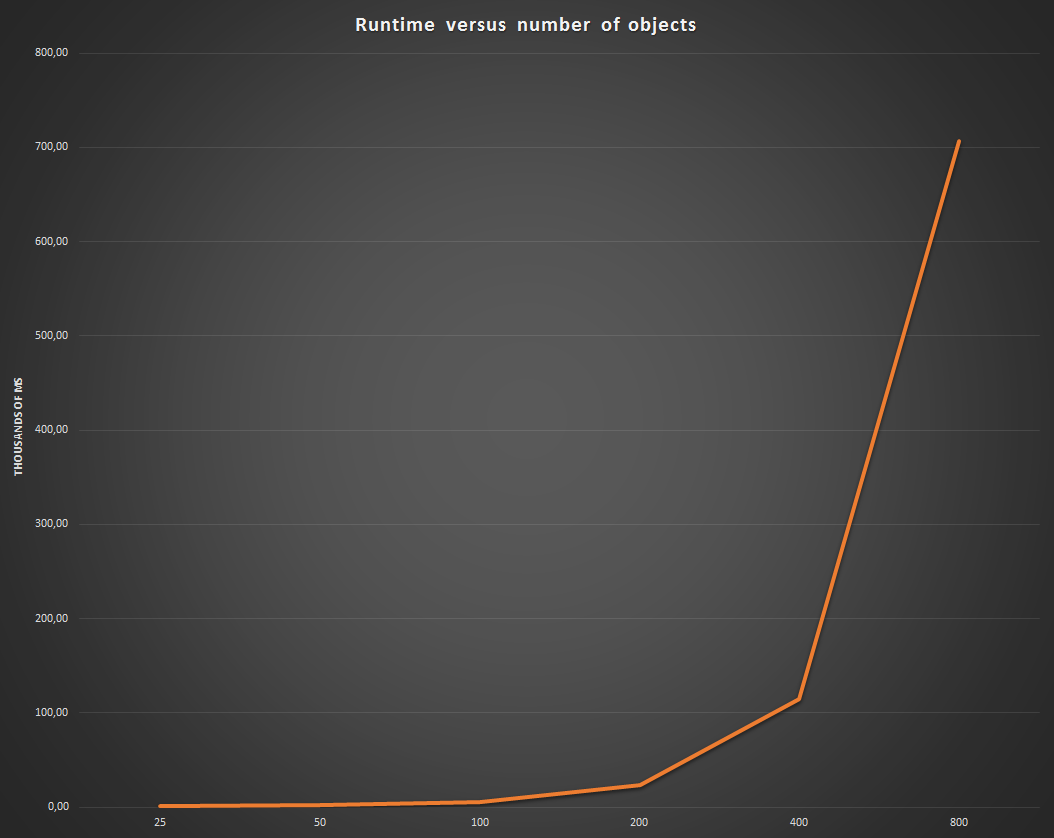
| Items in array | Time to complete one click (ms) | Time to select all (ms) |
|---|---|---|
| 25 | 1.408,136 | 22.233,092 |
| 50 | 2.156,774 | 77.999,535 |
| 100 | 5.871,934 | 473.352,168 |
| 200 | 23.124,779 | – |
| 400 | 115.075,14 | – |
| 800 | 707.176,804 | – |
When we graph this, you can see a clear O(n^2) performance bottleneck:
I wanted to change the grid’s source property to use a dataAdapter, However, that did render the table, but each colunm had no value. This is detailed in link where they say:
 March 30, 2012 at 12:53 pm

It is currently not possible to bind the grid datafields to observable properties. Could you send us a sample view model which demonstrates the required functionality, so we can create a new work item and consider implementing the functionality in the future versions? Looking forward to your reply.

Best Wishes,
Peter
How to see the real-time state of your view-model
When testing and debugging your web-application, its convenient to see the real-time state of the view-model. This is very easy when you’re using a data-binding framework such as knockout. You can simply bind the JSON representation of the view-model to some visible DOM element, like this:
<pre data-bind="text: JSON.stringify(ko.toJS(MyViewModel), null, 4)"></pre>
Sometimes, the objects in your view-model might have circular dependencies, like this:
//The ViewModel
var CurrencyViewModel = function () {
    var self         = this;
    this.DataContext = new CurrencyDataContext(this);
    this.Name        = ko.observable();
    ...
}
//The pseudo-model behind the ViewModel
var CurrencyDataContext = function CurrencyDataContext(ViewModel) {
    var self = this
    this.Viewmodel = ViewModel
    ...
}
In that case you’ll get the following error:
0x800a13aa - JavaScript runtime error: Circular reference in value argument not supported
You can fix this by overriding the toJSON() method, like this:
var CurrencyDataContext = function CurrencyDataContext(ViewModel) {
    var self = this
    this.Viewmodel = ViewModel
    ...
    //Needed to avoid circular reference when a viewModel is serialised into JSON
    CurrencyDataContext.prototype.toJSON = function ()
    {
        var copy = ko.toJS(self);
        delete copy.Viewmodel
        return copy;
    }
Entity Framework: How to delete your old database and start fresh with a new one
In a previous post I explained how to recover after deleting a Entity Framework database. In this post we’ll see the proper way to recreate the database in Entity Framework:
Careful
before you start, make sure you’ve got source-control or back-ups of the code in the Migrations folder. When you delete the Migrations folder, you’re deleting code that:
- seeds the database with the initial set of data
- and up/downgrades the database to the various versions
In Visual Studio:
- Go to Server Explorer, right-click on the data collection that represents your context and choose delete.
- Go to Solution Explorer and delete the .mdf file. You might have to click on the “Show All Files” icon before you see it.
- Go to the Solution Explorer and delete the
Migrationsfolder.
At this point, you have a solution that will create a new database when its run. If you need to seed the database or expect your models to change, then you’ll want to do the following:
- Tell EF to create a fresh database bases on the current models by going to the Package Manager Console and running the following commands:
Enable-Migrations
Add-Migration Initial
Update-Database
- Update the code in
Migrations\Configuration.csto seed the database with the data you need.
Ensuring events are raised when you programatically set a property using jQuery
If you use jQuery to set a property or value of a element, don’t forget that that events such as onchange() etc. etc. aren’t automatically raised. You need to do that manually in your code using the $().trigger() method:
$('#MyCheckbox').prop('checked', true).trigger('change');
Using jQuery to give your user a “check all” option in the UI
Say you have a table where each row contains a check-box and you want to be able to check/uncheck every single check-box based on some action the user does. Using jQuery this is very easy. Assume we have the following HTML:
        <table>
            <thead>
                <tr>
                    <th><input type="checkbox" id="HeaderCheckbox"/></th>
                    <th>Name</th>
                </tr>
            </thead>
            <tbody>
                <tr><td><input type="checkbox"/></td><td>Tea</td></tr>
                <tr><td><input type="checkbox"/></td><td>Coffee</td></tr>
                <tr><td><input type="checkbox"/></td><td>Cola</td></tr>
           </tbody>
        </table>
Then the following jQuery snippet will transform the HeaderCheckbox into a control that automatically checks or unchecks all the other check-boxes:
$(document).ready(function () {
    //Setup an eventhandler that fires
    //when the user clicks on a control whose id = HeaderCheckbox
    $('#HeaderCheckbox').click(function (eventobject) {
       //the DOM element that triggered the event
       var $this = $(this);
       //Determine what the requested state is.
       //I.e is the headercheck box checked or unchecked?
       var checked = $this.prop('checked');
       //Find each checkbox element below a <tr> and set
       //it to the requested sate
       $("tr :checkbox").prop('checked', checked)
    })
})
If you’re using some framework with data-binding (e.g. Knockout) then its way better to simply bind each check box to a property of the the View Model and just set that property. The HTML would look like this
        <table >
            <thead>
                <tr>
                    <th><input type="checkbox" id="HeaderCheckbox" /></th>
                    <th>Name</th>
                </tr>
            </thead>
            <tbody data-bind="foreach: Drinks">
                <tr>
                    <td><input type="checkbox" data-bind="checked: $data.Selected"/></td>
                    <td data-bind="text: $data.Name"></td>
                </tr>
            </tbody>
        </table>
And the associated JavaScript would look like this:
var DrinkViewModel = function () {
    this.Name           = ko.observable('');
    this.Selected       = ko.observable(false);
}

var viewModel = function () {
        var self = this
        //Holds all the drinks we want to list in the table
        this.Drinks = ko.observableArray();
}

$('#HeaderCheckbox').click(function (eventobject) {
    var $this = $(this);
    var checked = $this.prop('checked');
    $.each(MyViewModel.Drinks(), function (index, theDrink)
    {
        theDrink.Selected(checked)
    })
})
knockout.js: Your observable isn’t seeing changes made to text controls until they lose focus
knockout is great library that’s easy to use. One thing I noticed is that changes made in text-controls are only propagated to the observable once that control loses focus.
If you want changes in a text-control to immediately be reflected in your observable, then avoid the value binding and use the textInput binding like below:
<input data-bind="textInput: Name" type="text" value="" />
<script type="text/javascript">
    $(document).ready(function () {
        viewModel = ViewModel()
        ko.applyBindings(viewModel);

    });
    function ViewModel() {
        var self = this;
        self.Name = ko.observable("");
    }
</script>